
Toolszu Creator Review: Build Your Biolink Page in Minutes (Free)

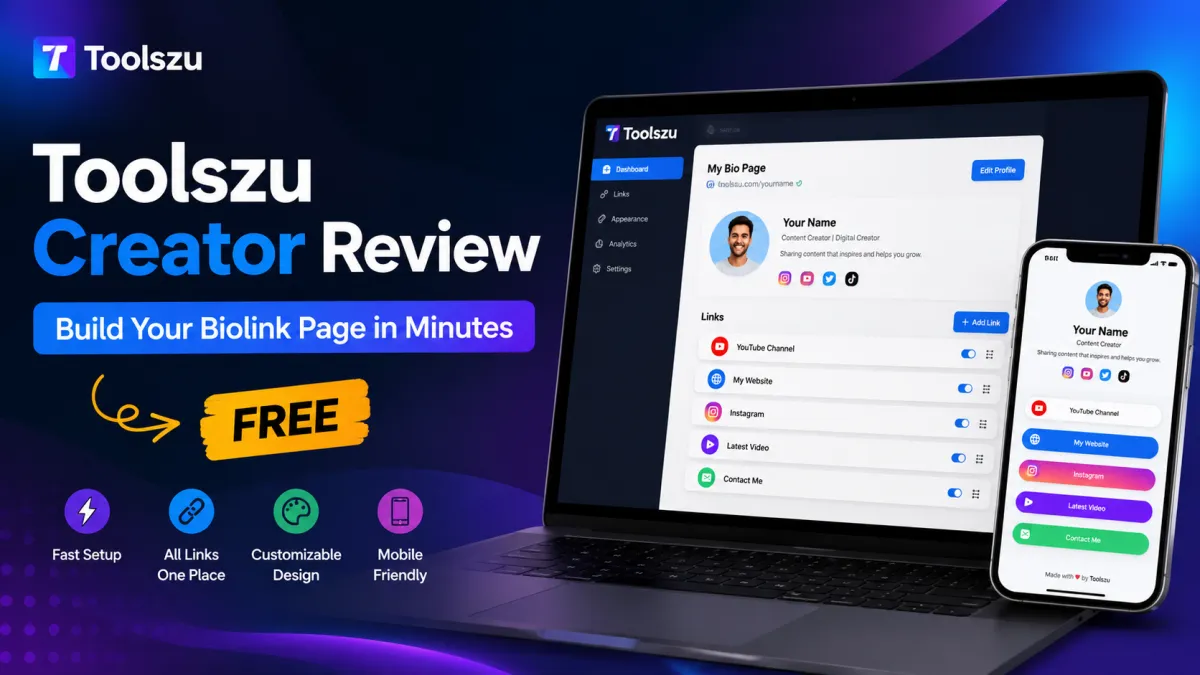
Creating a professional bio link page used to require design skills, paid tools, or complicated website builders. For creators, freelancers, influencers, and small businesses, that often meant wasting time managing multiple links across Instagram, YouTube, TikTok, and other platforms.
That’s where Toolszu Creator stands out. It offers a fast, beginner-friendly way to build a modern biolink page for free. Whether you want to showcase social profiles, products, videos, affiliate links, or portfolio content, the platform makes the process simple and accessible.
In this review, we’ll explore its features, usability, customization options, SEO benefits, and why it can be a smart alternative to expensive link-in-bio tools.
What Is Toolszu Creator?
Toolszu Creator is a free online platform that helps users create customizable biolink pages without coding. Instead of sharing multiple URLs separately, you can place all your important links on a single page and use one clean profile link everywhere.
This is especially useful for:
- Content creators
- Instagram influencers
- YouTubers
- Freelancers
- Affiliate marketers
- Small businesses
- Digital product sellers
The setup process is fast, and most users can publish a functional page within minutes.
First Impressions and User Experience
One of the strongest parts of Toolszu Creator is its clean interface. The dashboard is simple enough for beginners while still offering useful customization features for advanced users.
You can quickly:
- Add profile images
- Insert social links
- Create custom buttons
- Change colors and layouts
- Add video or product links
- Organize sections easily
Unlike many bloated page builders, the editor feels lightweight and responsive.
If you are creating graphics for your bio page, using an app screenshot generator can help you create professional mobile mockups for promotions and product showcases.
Key Features of Toolszu Creator
Fast Biolink Page Setup
The biggest advantage is speed. You can create and publish a bio page in just a few minutes.
The platform removes unnecessary complexity and focuses on essential creator tools. This makes it ideal for people who want a quick setup without dealing with hosting or WordPress plugins.
Mobile-Friendly Design
Most visitors access bio pages from smartphones. Toolszu Creator pages are responsive by default, which means they automatically adjust to different screen sizes.
This improves usability and keeps visitors engaged longer.
Easy Link Management
You can add, remove, or reorder links without technical knowledge. This flexibility is useful for creators who regularly update campaigns, affiliate offers, or social content.
For example, bloggers can combine it with an online image compressor to optimize promotional images before uploading them to social platforms.
Simple Branding Options
Custom branding is important for creators and businesses. Toolszu Creator allows users to personalize pages with colors, profile photos, and layouts.
Even free users can create pages that look polished and professional.
Useful for Multiple Niches
The platform works well for different types of users:
Influencers
Share Instagram, TikTok, YouTube, and sponsorship links in one place.
Freelancers
Display portfolios, client contact links, and service pages professionally.
Affiliate Marketers
Promote offers, landing pages, and lead magnets efficiently.
Small Businesses
Create a mobile-first landing page for promotions, catalogs, or customer support links.
SEO and Performance Benefits
Many creators ignore SEO when building bio pages, but page speed and usability still matter.
Toolszu Creator pages are lightweight and fast-loading, which helps improve visitor retention. Faster pages generally create a better user experience and can reduce bounce rates.
If you want to optimize content further, you can use a fancy text generator to style headlines and social captions creatively without installing extra apps.
For best practices around mobile usability and performance, Google’s official SEO Starter Guide is also a helpful resource.
Is Toolszu Creator Really Free?
Yes, the platform offers free access for users who want to create a basic biolink page quickly.
This makes it attractive compared to premium link-in-bio services that lock core features behind monthly subscriptions.
For beginners, students, startups, and solo creators, the free option is more than enough to get started.
Who Should Use Toolszu Creator?
Toolszu Creator is best suited for users who want:
- A free link-in-bio solution
- Quick setup without coding
- A mobile-friendly profile page
- Easy customization
- Simple content management
- Better organization for social links
It may not replace a full website for large businesses, but it works extremely well as a lightweight creator hub.
Pros and Cons
Pros
- Free to use
- Beginner-friendly interface
- Fast page setup
- Mobile responsive design
- Clean and lightweight dashboard
- Useful for creators and businesses
Cons
- Advanced enterprise-level customization is limited
- Not designed to replace large websites
- Some users may want more premium templates in the future
Tips to Make Your Biolink Page More Effective
Creating the page is only the first step. Here are a few ways to improve results:
Keep Important Links at the Top
Your most valuable links should appear first. This could include product pages, latest videos, newsletters, or contact forms.
Use Optimized Images
Large images slow down loading speed. Compress visuals before uploading to keep your page fast and mobile-friendly.
Write Clear Button Text
Avoid generic labels like “Click Here.” Use action-focused text such as:
- Download My Guide
- Watch Latest Video
- Book a Call
- View Portfolio
Update Links Regularly
An outdated bio page reduces engagement. Keep links current and remove expired promotions.
Frequently Asked Questions
Is Toolszu Creator free to use?
Yes. Users can create and publish a biolink page for free without needing coding knowledge.
Can I use Toolszu Creator for Instagram bio links?
Yes. It works well for Instagram, TikTok, YouTube, X, and other social platforms.
Does Toolszu Creator support mobile devices?
Yes. The pages are mobile-responsive and optimized for smartphone users.
Can beginners create pages easily?
Yes. The editor is simple and designed for non-technical users.
Is Toolszu Creator good for affiliate marketing?
Yes. Affiliate marketers can organize multiple offers, landing pages, and promotional links efficiently.
Can I customize my bio page design?
Yes. Users can personalize layouts, profile images, colors, and buttons.
Final Verdict
Toolszu Creator is a practical and beginner-friendly solution for anyone who needs a fast, clean, and free biolink page.
The platform focuses on simplicity without sacrificing the essential features creators actually need. Whether you are an influencer, freelancer, affiliate marketer, or small business owner, it offers a convenient way to organize your online presence in minutes.
If you want an easy alternative to expensive link-in-bio tools, Toolszu Creator is definitely worth trying.